Download Free Smart Defrag

Smart Defrag

The World’s Most Efficient Defragmenter
What’s the primary cause of slow/unstable PC performance? It’s disk fragmentation.

Smart Defrag helps defragment your hard drives more efficiently than any other product on the market –– free or not.


Features of this powerful, award-winning defragmenter program include:

  • An "Install It and Forget It" feature that works automatically and quietly in the background on your computer.
  • The ability to constantly keep your hard drive safe, error-free and running at its top speed and optimum performance.
  • Eliminates slow downs, freeze-ups and crashes.
  • Smart Defrag is 100% FREE award-winning software that’s for personal, home and small business.
  • 100% safe from any spyware, adware and virus.
  • Designed for Windows Vista, XP, and 2000, including Windows Server Eiditions.
  • 100% Free for home, small business, organization, and enterprise.
  • Distribute it freely, copy it, or include it as part of a package – as long as it is left completely intact and unchanged.

Download Smart Defrag [2.34 MB]

Source : iobit.com

| Continue Reading..

RPS Demands: 10 Things All PC Games Should Do

Less a manifesto, and more a notverymanlyfesto, as this is very much a tech-centric list. If you want thoughtful game theory, you’ve got the wrong nitpicker.

The PC is the best gaming platform in the world - but it could be better still.

While it’s great that the PC doesn’t have to suffer quite the same degree of standardisation as its locked-down console brethren, we have nevertheless fallen into certain patterns of how we game. There are things we take for granted and thus expect, like WASD controls in FPSes and patches for bad bugs. There are others still we should be able to take for granted, but can’t because the same damn-fool oversights happen again and again. Even outside of the more obvious annoyances like referring to Xbox controls or including ridiculously draconian DRM (which are both more a question of money than of thoughtlessness), a ton of stuff that any gamer could have told the developer was a glaring screw-up keeps on turning up in otherwise great games. Here are just 10 of the worst offenders, 10 things that every single modern PC game should get right and has no excuse not to. Please do suggest others in comments below.
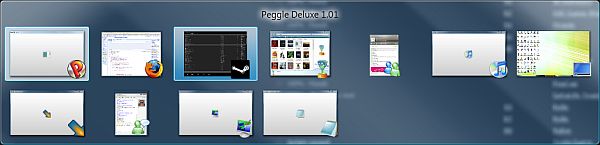
Been there forever. Come on!

1. Alt-tab support.

Perhaps the single greatest, but so often neglected, Must-have there is. Just having rudimentary task-switching support in there isn’t enough (hello-o Valve games) - it needs to be fairly quickly and smooth, and included in the original release of the game, not in a patch down the line. This should be as big a priority as graphics or sound. Don’t care if it’s a massive pain to code in. Don’t care if you have to re-start the entire game from scratch to put it in. Alt-tab is absolutely integral to the way we all use our PCs. Half of us essentially live at our computers - we need to be able to task-switch to an IM window or an inbox or even another game in moments, not be locked into one program. Frankly - if your game doesn’t alt-tab, it’s not really a PC game.

Possibly deserving an entry of its own, but in the name of keeping this list to 10 I’ll include it here - all PC games should be able to play in a window. I’ve missed social events because someone’s instant messaged me about going to the pub, but not bothered to phone or text when I don’t get back to them right away because I’m off in a game. One day, the girl of my dreams will magically message me, and by the time I’ve exited the game she’ll have got bored of waiting and declared her love for my arch-nemesis (I don’t actually have an arch-nemesis, but I’m working on it). Then I will hunt down and kill the developer of whichever unwindowable game I was playing at the time. They will appreciate why. Window play is also necessary for 2D games whose resolutions can’t be changed - 800×600 pixels of pretty hand-drawn art look like roadkill in toontown when they’re stretched over a 1680×1050 panel.
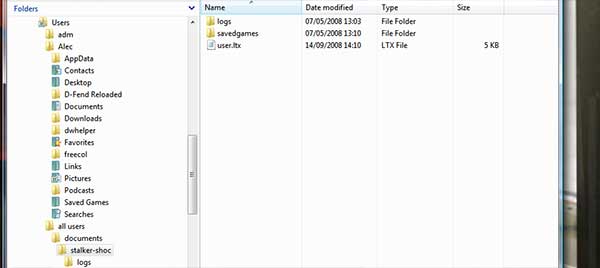
Unbelievably, Clear Sky's savegame location was equally silly as its forerunner's

2. Use standardised install and savegame folders

Everything goes in Program Files by default, please (and, just as importantly, there needs to be an option to install anywhere the player would rather). Don’t have your game install itself into the root of C:\ or an obscure sub-folder, and when you do put it in Program Files don’t stick it inside [Publisher name]\[Developer name] - just stick a folder directly in there under the game’s name. Gamers want to be able to find their game files easily, not have to Google for everyone involved in its creation just so they can work out what folder it’s in.

This is doubly true of savegames. We need to be able to back those suckers up in case of disaster or a Windows reinstall. Know where STALKER hides its savegames in Vista? C:\Users\all users\documents\stalker-shoc, that’s where. Here’s where games whose developers aren’t crazy stick their saves on my PC - C:\Users\Alec\Documents\My Games. In other words, the standard My Games folder inside (My) Documents, a two-click, standard process to reach. To find STALKER’s saves, I have to dig through five separate sub-folders, in something I’d never otherwise look at. Who are these mythical ‘All Users’? They’re not me, that’s who.

Even our beloved World of Goo fails at this. The game goes into Program Files\World of Goo. The savegame - and the savegame alone - goes into C:\ProgramData\2DBoy\WorldOfGoo. ProgramData? Worse, that’s actually a hidden folder by default. Gah!

3. Automatically set themselves to your desktop screen resolution

Don’t default to something horrid and archaic like 640×480. The vast majority of PC gamers use flatpanel monitors, and games running at anything other than their native resolution tend to look horrible. Save us the hassle of changing the setting ourselves, but most of all save the less tech-savvy from having to work out what a resolution even is in the first place, or just putting up with a blurry screen because they’ve no idea how to fix it. Clearly, still allow the resolution to be easily changed to whatever the gamer wants, however: the game needs to support every res the monitor does.

SWAT IV - Man, I loved editing those ini files for widescreen!

4. Support widescreen resolutions.

Widescreen isn’t the future - it’s the present. Just look at the consoles for proof of that, or at the top hits for ‘monitor’ on Amazon. And expecting us to edit an ini file or type in command lines doesn’t count as widescreen support.

5. Uninstall in seconds.

Don’t have it laboriously check every single damn file before it has the grace to remove ‘em - just wipe the folder, pull the main hooks out of the registry and be done with it. I uninstalled the FIFA 09 demo today, and it all but locked up my PC for ten minutes while it did its ridiculous, disc-churning thing. Then I uninstalled the King’s Bounty: The Legend demo, and it was gone in the blink of an eye. That’s the way to do it. When I want someone to leave my house, I just want them gone - I don’t want them hanging around on the doorstep making tedious chit-chat for half an hour. Tied into this is installing neatly in the first place to ensure removal is simple - the game should all end up in one place, not explode tiny bits of itself all over the hard drive.

FIFA 09 - takes 12 years to uninstall

6. Don’t require the CD/DVD in the drive to play.

Again, we’re talking about a PC, a device with hundreds of gigabytes of storage. A game needing to look at a plastic disc entirely external to the game install folder whenever it runs is openly ludicrous. I know it’s for copy protection’s sake (and even so is of debatable effectiveness in this day and age), but the annoyance to legit customers surely outweighs a few extra lost sales before the inevitable no CD crack turns up anyway. Requiring PC gamers to scrabble through a vast pile of discs just to play the game they’ve already installed is contrary to the nature of the platform, and lures people towards less than legal solutions that may ultimately push them further towards piracy. And you wouldn’t want that, would you publishers?

Continue here : rockpapershotgun.com

Technorati Tags: ,,
| Continue Reading..

Visual Studio 2010 and .NET Framework 4.0 Overview

Visual Studio 2010 and the .NET Framework 4.0 mark the next generation of developer tools from Microsoft. Designed to address the latest needs of developers, Visual Studio and the .NET Framework deliver key innovations in the following pillars:

  • Democratizing Application Lifecycle Management
    Application Lifecycle Management (ALM) crosses many roles within an organization and traditionally not every one of the roles has been an equal player in the process. Visual Studio Team System 2010 continues to build the platform for functional equality and shared commitment across an organization’s ALM process.
  • Enabling emerging trends
    Every year the industry develops new technologies and new trends. With Visual Studio 2010, Microsoft delivers tooling and framework support for the latest innovations in application architecture, development and deployment.
  • Inspiring developer delight
    Ever since the first release of Visual Studio, Microsoft has set the bar for developer productivity and flexibility. Visual Studio 2010 continues to deliver on the core developer experience by significantly improving upon it for roles involved with the software development process.
  • Riding the next generation platform wave
    Microsoft continues to invest in the market leading operating system, productivity application and server platforms to deliver increased customer value in these offerings. With Visual Studio 2010 customers will have the tooling support needed to create amazing solutions around these technologies.
  • Breakthrough Departmental Applications
    Customers continue to build applications that span from department to the enterprise. Visual Studio 2010 will ensure development is supported across this wide spectrum of applications.

Over the next few months we will provide more detail in each of these pillars. We will start with “Democratizing Application Lifecycle Management.”

Please check back shortly to see the next pillar, “Enabling emerging trends.”

Microsoft Visual Studio Team System 2010 – Democratizing Application Lifecycle Management
Visual Studio Team System 2010 will deliver new capabilities that embrace the needs of the users in the lifecycle – from architects to developers, from project managers to testers.

Among the great new functionality in VSTS 2010:

  • Discover and identify existing code assets and architecture with the new Architecture Explorer.
  • Design and share multiple diagram types, including use case, activity and sequence diagrams.
  • Improve testing efforts with tooling for better documentation of test scenarios and more thorough collection of test data.
  • Identify and run only the tests impacted by a code change easily with the new Test Impact View.
  • Enhanced version control capabilities including gated check-in, branch visualization and build workflow.

Key to a shared understanding of the application is the use of modeling tools. Modeling has traditionally been done by professional architects and system designers. Our approach is to enable both technical and non-technical users to create and use models to collaborate and to define business and system functionality graphically.

Visual Studio Team System 2010 includes a new Architecture Explorer for the discovery and exploration of existing code assets and application architectures.

More : msdn.microsoft.com

| Continue Reading..

Microsoft to back jQuery library

Visual Studio will ship with jQuery JavaScript technology that simplifies AJAX interactions for rapid Web development.

Microsoft plans to incorporate the jQuery JavaScript library into its Visual Studio platform, according to several blogs published on Sunday.

JQuery, the jQuery Web site states, is "a fast and concise JavaScript library that simplifies HTML document traversing, event handling, animating, and AJAX interactions for rapid Web development." The technology also was described as lightweight and cross-browser.

"JQuery is designed to change the way that you write JavaScript," according to the site.

Microsoft's Scott Guthrie, corporate vice president in the company's developer division, noted Microsoft's intentions to support the open source technology.

"I'm excited today to announce that Microsoft will be shipping jQuery with Visual Studio going forward," Guthrie said. "We will distribute the jQuery JavaScript library as is, and will not be forking or changing the source from the main jQuery branch.  The files will continue to use and ship under the existing jQuery MIT license."

Microsoft also will distribute intellisense-annotated versions that provide "great" Visual Studio intellisense and help-integration at design time, Guthrie said.

"A big part of the appeal of jQuery is that it allows you to elegantly (and efficiently) find and manipulate HTML elements with minimum lines of code," said Guthrie.

"JQuery is a fantastic library, and something we think can really benefit ASP.Net and ASP.Net AJAX developers.  We are looking forward to having it work great with Visual Studio and ASP.Net, and to help bring it to an even larger set of developers," Guthrie said.

The jQuery intellisense annotation support will be offered as a free Web download in a few weeks and will work with Visual Studio 2008 Service Pack 1 and the Visual Web Developer 2008 Express Service Pack 1. A new ASP.Net MVC download will distribute it as well and add the jQuery library by default to new projects, Guthrie said.

Microsoft product support will be extended to jQuery later this year, enabling developers and enterprises to call and open jQuery support cases.

John Resig, of the jQuery development team, said Nokia also was taking steps to adopt jQuery as part of its official application platform.

source : infoworld.com

| Continue Reading..

Top 10 Windows Forms Articles You Must Read

If you have missed on some top articles of WinForms on dotnetcurry.com, then this is a must read for you. The Top 10 articles have been decided by our editorial panel based on the popularity of the article, user rating and top views of the articles.

The articles have been arranged based on the total views from top to bottom. I hope you enjoying reading them, as much as we did while compiling them!!

1. DataGridView in Windows Forms – Tips, Tricks and Frequently Asked Questions(FAQ)

DataGridView control is a Windows Forms control that gives you the ability to customize and edit tabular data. It gives you number of properties, methods and events to customize its appearance and behavior. In this article, we will discuss some frequently asked questions and their solutions. These questions have been collected from a variety of sources including some newsgroups, MSDN site and a few, answered by me at the MSDN forums

2. Display a list of all fonts installed on a computer using Windows Forms

The System.Drawing.Text.InstalledFontCollection is a non-inheritable class that contains the functionality to represent the fonts installed on the system. You can use this class and return an array containing the names of all the fonts on your system. In this article, let us see how to use this class and display the list of available fonts

3. How to Close Parent Form from Child Form in Windows Forms 2.0

With the MSDN forums flooded with similar questions, I decided to dedicate an article for the subject. In this article, we will create two forms, a parent and a child and then open the child form using the Parent Form. When the child form closes, we will close the Parent form too.

4. Drag, Drop and Move Items from One CheckedListBox to Another using Windows Forms

In this article, we will explore how to drag, drop and move items from one checkedlistbox to another

5. Drag and Drop Images Into a PictureBox

This article was written simply out of curiosity. I was doing a similar operation using web technologies and just wanted to try out how it works with Windows Forms. I have recorded the steps in this short article, where we will explore how to drag and drop images into a PictureBox.

6. Create, Read, Write, Copy, Move and Delete a Text File using C# and VB.NET

In this article, we will explore some common text file operations using C# and VB.NET. This article has been requested by a long time reader of dotnetcurry.com. NET provides various classes like the File and FileInfo, to create, read, write and perform such similar operations on a text file. For example, you can use the Create() method of the File class to create a text file. The same could also be done using the CreateText() method of the FileInfo class. Similarly these classes also contain functionality to copy, move or delete a file. The trick is to find out when to use which class and for what purpose.

7. Some Common Conversion Functions – Part I

In this article, we will explore some commonly used conversion functions in our projects. This is the first part of our two part series. I will cover up some other commonly used conversions in the second part.

8. 30 Common String Operations in C# and VB.NET – Part I

In this article, I have compiled some common String operations that we encounter while working with the String class. In Part I, I have covered 15 common string operations. In the next article, I will continue this article and cover 15 more.

9. 30 Common String Operations in C# and VB.NET – Part II

In the previous article, 30 Common String Operations in C# and VB.NET – Part I, we explored 15 common String operations while working with the String class. In Part II of the article, we will continue with the series and cover 15 more.

10. How to Create Thumbnail Images in C# and VB.NET

A thumbnail is a small sized image. Creating a thumbnail using .NET is extremely simple. In this article, we will explore how to create a thumbnail image and display the thumbnail in our application.

I hope you liked this compilation and I thank you for viewing it.

Source : dotnetcurry.com

Technorati Tags: ,,
| Continue Reading..

Windows 7 Pre-Beta Availability Confirmed

Microsoft is making headway with the building process of Windows 7, the next iteration of the Windows client, and is gearing up to release a development milestone of the operating system at the end of next month.

Microsoft's professional Developers Conference in Las Vegas, between October 27-30, 2008 will be synonymous with the broadening of the Windows 7 testing program past the limited testing pool of the company's close partners that was given access to early builds including Milestone 1, Milestone 2 and Milestone 3. The Redmond giant will in fact offer a pre-Beta build of Windows 7 to all PDC2008 participants.

"We're (...) giving every attendee a pre-beta copy of Windows 7. Yes, you heard that right. You'll be able to install your own copy of Windows 7 and play with it on your hardware. This is a very limited release, and PDC2008 attendees will be the first to get it. Gotta love the PDC," revealed Mike Swanson, Microsoft technical evangelist.
In just one month Microsoft plans to deliver the first consistent taste of Windows 7. The company demonstrated the operating system's touch computing capabilities earlier this year, but otherwise detailed in no way M1, M2 or even M3. Screenshots, videos and a tad of information on the recently dropped Windows 7 Milestone 3 Build 6780 were made available from third party sources, but Microsoft continued to be mute on the matter. At PDC2008 Steven Sinofsky, senior vice president, Windows and Windows Live Engineering Group, will be the one to introduce Windows 7 to the world.

"In our first keynote at PDC2008 Ray Ozzie will talk about the new world of Software Plus Services, with Bob Muglia joining him, to unveil our new Cloud Computing platform," Microsoft revealed. "In a second keynote, Ray will return to talk about building immersive user experiences and introduce Steven Sinofsky, who will give developers a first look at the next version of Windows, Windows 7. Scott Guthrie and David Treadwell will join Ray and Steven to dive deep on the latest Win32 and .NET platform advances that enable a next generation of user experiences spanning multiple devices, including a look at the latest developments in .NET, Silverlight, "Live Mesh", and the rest of the client platform."

source : news.softpedia.com

Technorati Tags: ,
| Continue Reading..

How Android Hurts Microsoft

Think "baby seals" with regards to the clubbing Google gave Microsoft today.

"Whack, whack, whack" was the sound coming out of New York, where Google, HTC and T-Mobile launched the Android-based G1. The mobile phone goes on sale Oct. 22.

Google clubbed Apple, too, but Microsoft will be the more seriously injured. Today, Google officially launched its alternative platform to the Windows PC. Microsoft is frakked.

The Android-based G1 is Microsoft CEO Steve Ballmer's worst fears bundled together in a tidy package: Google, Web applications, open source and a platform alternative to Windows. Worse: easy access to Google's plethora of online services—including Calendar, Contacts, Gmail, Google Talk, Maps Street View and YouTube—via single sign-on. There is a single point of connection and synchronization to Google's goodie bag. Get this: No PC is required. Google syncs from the Web to the phone. Microsoft has got nothing like it, but should.

As I've blogged before, sync is the killer application for the connected world. In 2007 I warned: "If Google gets synchronization right before Microsoft, it's game over." Something else I warned: "If Google and its partners can bring to mobile devices what they have to the desktop, I predict it will be game over for Microsoft. Windows' relevance will diminish before the Web platform."

I can't blog this enough times: The PC era is waning. The cell phone is more personal than the PC, and it has great Web 2.0 platform affinity. The cell phone's destiny is inevitable. Mobiles will replace PCs as the most widely used personal devices; today, they're more adjuncts. There's a role reversal rapidly coming. For many teens using T-Mobile Sidekicks or businesspeople tapping BlackBerrys, the transition already is here.

Google Like Glue

But Google's clubbing of Microsoft is a more complex action than that. The first Android-based cell phone begins a transition that could solve some big problems for Google:

* Search isn't sticky enough. For all Google's search success, another provider is but a new Web address away. Search isn't sticky. People can easily change search providers. Applications are stickier. Hardware is stickiest. People who buy G1s will get the Google brand (on the back) and easily accessible Google-branded applications and services.

* Google is dependent on Microsoft for its success. For all Google's search dominance, the main means by which most people consume the information company's goods and services is the Windows PC. Google can't control Windows or the user experience there. Microsoft can make decisions about user interface design, Web applications integration or other platform characteristics that have huge impact on Google products—and Microsoft has huge incentive to keep computing relevance from shifting to the Web from the PC. Android-based cell phones give Google control on the emerging computing platform.

* Google didn't have its own operating system and development platform. The Web 2.0 platform is compelling, but it's not enough. As I've repeatedly blogged, the next successful computing platform must have software plus hardware plus services. In May, I blogged that Microsoft had solved the Google problem. But I'm no longer convinced. The first Android-based phone and Google's Chrome browser are game-changing. Google now has an independent platform and in the right place.

Cell phone manufacturers ship more mobiles each year—1 billion units—than the entire Windows PC install base. In many emerging markets, cell phones are the first Internet-capable devices many people own. The phenomenon is well documented from past technological transitions, where the new market skips over the old thing for something newer. Google has seen the future. Why hasn't Microsoft? The company is too bound to the desktop.

I can't express how much Microsoft has screwed up here. Compared to the iPhone or G1 UIs, Windows Mobile is clunky and chunky. There is no integrated application store, which is a killer concept, by the way. More importantly, there is no compelling integration or synchronization with other Microsoft products or services. Microsoft is driving integration from Internet Explorer 8, and I've long expected it with Windows 7, too. But not in mobile. Windows Live for Mobile has potential, but it doesn't compare to a Google-branded phone, running a Google operating system that links and syncs with Google services.

source: microsoft-watch.com

Technorati Tags: ,,
| Continue Reading..

Enter your email address:

Delivered by FeedBurner

Followers
