Showing posts with label Development. Show all posts

VS 2010 and .NET 4.0 Beta 2

captured_Image.png I’m happy to announce that today we shipped the Beta 2 release of Visual Studio 2010 and .NET 4.0.  MSDN subscribers can download Beta 2 immediately. 

We will be opening up Beta 2 for everyone to download starting this Wednesday.

image

VS 2010 and .NET Improvements

VS 2010 and .NET 4 bring a huge number of improvements and additions. They include big advances for ASP.NET web development, WPF and WinForms client development, SharePoint development, Silverlight development, data development, parallel computing development, and cloud computing development.  VS 2010 also delivers a ton of improvements in the core IDE, code editors, programming languages, and enterprise design, architect, and testing tools. 

TFS 2010 is now easy to install (only 20 minutes to setup source control, bug and work item tracking, build automation, and continuous integration), can be installed on both servers as well as client OS and domain controller machines, and is now included with all MSDN subscriptions of Visual Studio.

I’ve started a series of blog posts that will cover some of the improvements and feature additions in VS 2010 and .NET 4.  Stay tuned to my blog as I post many, many more posts over the coming months.

VS 2010 Product Line SKU Simplifications

With VS 2010 we are simplifying the product lineup and pricing options of Visual Studio, as well as adding new benefits for MSDN subscribers.  With VS 2010 we will now ship a simpler set of SKU options:

  • Visual Studio Express: Free Express SKUs for Web, VB, C#, and C++
  • Visual Studio 2010 Professional with MSDN: Professional development tools as you are used to today with the addition of source control integration, bug tracking, build automation, and more. It also includes 50 hours/month of Azure cloud computing.
  • Visual Studio 2010 Premium with MSDN: Premium has everything in Professional plus advanced development tools (including richer profiling and debugging, code coverage, code analysis and testing prioritization), advanced database support, UI testing, and more.  Rather than buying multiple “Team” SKUs like you would with VS 2008, you can now get this combination of features in one box with VS 2010. It also includes 100 hours/month of Azure cloud computing.
  • Visual Studio 2010 Ultimate with MSDN: Ultimate has everything in Premium plus additional advanced features for developers, testers, and architects including features like Intellitrace (formerly Historical Debugging), the new architecture tools (UML, discovery), test lab management, etc.  It also includes 250 hours/month of Azure cloud computing.
Side by Side Support with VS 2008

VS 2010 and .NET 4.0 can be installed side-by-side on the same machine as VS 2008 and .NET 3.5.  You can install the Beta 2 version on a machine and it will not impact your existing VS 2008 / .NET 3.5 development.

Go-Live License Available

.NET 4 and VS 2010 Beta 2 include a “go-live” license which means you can start using the products for production projects. 

From : weblogs.asp.net/scottgu/

| Continue Reading..

Expression® Studio 3 Top Features

Expression Studio 3 Features Expression Studio 3 Released and available for download the trial version from Microsoft website. Featured are tools including Expression Blend 3, for interactive design and improving designer-developer workflow;  Expression Web 3, for building Web sites using standards such as PHP and HTML; Expression Encoder 3, for video-encoding; and Expression Design 3, for illustration and graphic design.

Top 10 Features

- SketchFlow revolutionizes the speed and efficiency with which you can prototype a vision for an application

- Rapidly demonstrate and iterate on ideas, application flows, screen layouts and functionality with your client using a SketchFlow prototype.

- Enable interactivity without writing code

- Bring an Expression Blend project to life by adding interactivity, animation and transitions using drag and drop Behaviors, powerful building blocks of interactivity, without writing code.

- Accelerate the design of effective UI with design time data

- Increases the speed and flexibility you can envision a user interface in Expression Blend through the effective use of sample data. Sample data can be seamlessly switched to a live data feed at any time.

- Streamlined design and development workflow

- Share projects, code, and designs for better productivity and quality. The smooth workflow between Expression Blend and Visual Studio help the delivery of superior results to your client, who today more than ever expect; compelling, cutting edge solutions to be delivered in rapid time and on budget.

- Professional tools save time creating Web sites that deliver results

- Expression Web features an advanced code editor with IntelliSense, an editable design surface, and includes Expression Design and Expression Encoder for creating graphics and encoding Silverlight video for Web streaming or podcast download.

- Advanced visual diagnostics speed debugging

- Debug Web pages with Snapshot Preview, which shows rendered page changes while you code, and SuperPreview, which displays your page on multiple browsers on your development machine.

- Rich standards-based Web design with the essential technologies

- Expression Web supports PHP, CSS, HTML/XHTML, XML, XSLT, JavaScript, ASP.NET, ASP.NET AJAX, Silverlight (video, animation, and Deep Zoom), Windows Media, Adobe Flash, and Adobe Photoshop files.

- Prepare video for Silverlight

- Encode a wide array of video file formats, stream live from webcams and camcorders or screen capture your PC with Expression Encoder. Make simple edits to video files and enhance your media with overlays and advertising. Choose encoding settings including IIS Smooth Streaming, choose from a range of player templates and publish rich media experiences with Microsoft Silverlight.

- Team Foundation Server Integration

- Share your Expression Studio project files with those of your colleagues by using check in and check out functionality with Microsoft Team Foundation Server integration.

- Adobe Photoshop Importer

- Import your Adobe Photoshop files with full control over layers and objects straight onto the design surface of all Expression products to ensure maximum compatibility with any original artwork you need to integrate.

"Expression 3 introduces a broad range of new features such as SketchFlow in Expression Blend and SuperPreview in Expression Web. These features and others provide improved usability and productivity across the designer and developer workflow," a Microsoft representative said in a statement.

More info in this Web page, the triad download page also available.

| Continue Reading..

SlickMap CSS – A Visual Sitemapping Tool For Web Developers

SlickMap CSS - Developers' Visual Sitemapping SlickMap CSS is a simple stylesheet for displaying finished sitemaps directly from HTML unordered list navigation. It’s suitable for most web sites – accommodating up to three levels of page navigation and additional utility links – and can easily be customized to meet your own individual needs, branding, or style preferences.


The general idea of SlickMap CSS is to streamline the web design process by automating the illustration of sitemaps while at the same time allowing for the predevelopment of functional HTML navigation.

Features and Benefits
  • Eliminates the need for additional software
  • Easily revised with clients on-the-fly
  • Clickable anchors with visible URLs
  • Design process results in working HTML code

Download | View Demo

| Continue Reading..

Silverlight 3 Release To Web!

Fully supported by Visual Studio and Expression Blend, highlights of new features and functionality of Silverlight 3 include: major media enhancements, out of browser support allowing Web applications to work on the desktop; significant graphics improvements including 3D graphics support, GPU acceleration and H.264 video support; and many features to improve RIA development productivity.

Also, in order to fully integrate all the .NET developer tools, Visual Studio 2010 will support a fully editable and interactive designer for Silverlight.

Silverlight 3.0 What’s New page and Silverlight Program Manager Tim Heuer explains Silverlight 3.0 features in detailed on his blog, which is especially useful for developers.

Microsoft is going to host an online version of Silverlight 3.0 with Microsoft Expression 3.0 launch will be held at www.seethelight.com, which is set to online on July 10, 2009, the original launch date for Silverlight 3.0.

Experience Smooth Streaming

The Silverlight browser plug-in allows you to see Smooth Streaming in action on this page. (If Silverlight is not installed, please install it when prompted.) If the Internet bandwidth and video rendering capability on your playback device are sufficiently high, you'll experience high-definition video playback of the sample content. You will also be able to simulate end user experiences under varying conditions by simulating drops and recoveries in bandwidth. If your actual bandwidth is below 3 Mbps, or your playback device is video-challenged, then you will experience the adaptive nature of Smooth Streaming without needing to simulate a bandwidth cap. www.iis.net.

Download Silverlight 3

| Continue Reading..

Subsonic 3.0 Released!

captured_Image.png SubSonic is A Super High-fidelity Batman Utility Belt that works up your Data Access (using Linq in 3.0), throws in some much-needed utility functions, and generally speeds along your dev cycle.

SubSonic 3.0 is the latest version of SubSonic and was released in June of 2009. Work on SubSonic 3.0 lasted close to a year, and revolved mostly around supporting Language-integrated Query, also known as LINQ.

The focus of SubSonic 3.0 is to provide tools, not guidance or an overall mindset/approach. There are a number of things in SubSonic that allow you to move faster while applying whatever patterning floats your boat. We're not as complete as NHibernate, but you'll work faster with less concept count. We're not as deep as Linq to SQL, but you can use our stuff on most databases.

Linq

SubSonic 3.0 supports Linq with a core Expression Parser that turns System.Linq.Expressions into SQL. In addition, our 2.0 Query Tool (now called SimpleQuery) can use Lambda expressions to simplify some tasks.

All of the templates we use build on top of our core parsers and query tools, and you can build on top of these quite easily.

Simple Query Tool

The Simple Query Tool works almost exactly as it did with SubSonic 2.x - as a fluent "SQL-style" query tool that allows you to query the database almost as if you're using SQL.

The additions to this tool include Expression support for Where's as well as a "ToList<>()" method that will execute a query and load an object for you.

Utilities

SubSonic also comes with a number of utility methods expressed as Extension Methods. This is SubSonic's Sugar Utility Library and has a number of things to save you time, including File IO, string methods, date math, number utilities, and Object parsing.

Download Subsonic 3.0

Technorati Tags: ,,,
| Continue Reading..

MonoDevelop 2.0 Rivals Microsoft Visual Studio

The Mono Project's MonoDevelop is a full IDE for developing C# programs under the Mono runtime. If you’ve worked with Microsoft Visual Studio, you will see many similarities in MonoDevelop and will feel quite comfortable in the Mono environment. If you’re new to MonoDevelop and haven’t worked in Visual Studio, you’ll find that the learning curve is not very steep.

The Mono Project recently released Version 2.0 of MonoDevelop, a full IDE for developing C# programs under the Mono runtime.

The short story is that if you’ve worked with Microsoft Visual Studio, you will see many similarities in MonoDevelop and will feel quite comfortable in the Mono environment. If you’re new to MonoDevelop and haven’t worked in Visual Studio, you’ll find that the learning curve is not very steep.

One important change in Version 2.0 is the use of the MSBuild file format. Since Mono is an open-source implementation of Microsoft’s .NET runtime, it makes sense to support as many .NET tools and formats as possible.

As somebody who has been faced with porting from Visual Studio to Linux and other operating systems, I can say that one of the biggest frustrations is the build process. With Visual Studio’s proprietary build file formats (which are similar to make files, but not at all compatible with the standard make utilities), the support for MSBuild file formats is a welcome addition to MonoDevelop.

Another new feature is the way in which solutions are handled. Previously, MonoDevelop used nested solutions, but now, to be more compatible with Visual Studio’s solution system, MonoDevelop allows you to organize projects as folders within a solution.

In addition to many other improvements—such as per-project policies and opening multiple solutions simultaneously (something you can’t do in Visual Studio)—MonoDevelop now includes a powerful assembly browser. This tool is particularly useful for its ability to let you inspect the contents of an assembly, right down to the IL, including types and member definitions.

Originally, Mono did not support ASP.NET, but it wasn’t long before support was added. Now, as the support has become stronger and more complete, MonoDevelop has been enhanced to offer full support for ASP.NET. For example, the Web projects (which are handled differently than non-Web projects within Visual Studio) are compatible with Visual Studio 2008, including Visual Web Developer. Again, this will make porting much easier.

Of course, MonoDevelop is for Linux, and, as such, it caters to the needs of the typical Linux developer. For example, the editor in MonoDevelop has almost full vi support, including most of the common vi commands.

Although many of us who work primarily in Visual Studio are perfectly comfortable with the Visual Studio editor, I personally know many Linux and Unix developers who are much more at-home with the vi editor. (And I, for one, can attest that once you learn vi, you never forget it.) So even though vi often gets a bad rap as being archaic, it’s fast and efficient when you know what you’re doing. This is a welcome addition to MonoDevelop.

Next, and this is a biggie, MonoDevelop now has full GUI support for debugging, both with MDB (Mono Debugger) and the standard GDB support. You can set breakpoints within the IDE, and step through your code, inspect and evaluate expressions, and more.

In short, MonoDevelop Version 2.0 is a fine tool that is on par with Visual Studio and offers many features beyond those that I’ve listed here. These include  a split-view code editor; incremental search bar (something many of us love once we start using it); and code folding. You can see the whole list of improvements at http://monodevelop.com/Download/MonoDevelop_2.0_Released.

Finally, you’ll want to be aware of one shortcoming: Right now, MonoDevelop is available only on Linux and Mac OS X, not Windows. However, this is temporary; a team within the Mono project is actively working on porting it to Windows. You’ll want to keep an eye on the main page at monodevelop.com for more information.

Source : eweek.com

| Continue Reading..

Visual Studio 2010 and .NET 4.0 Beta Updated Log Collection Utility

The Visual Studio 2010 and .NET Framework 4.0 are now available, here are the new update for Visual Studio 2010 and .NET Framework 4.0 by Microsoft.

One illustrative example in this regard is the Collect.exe log collection utility. The tool was updated and tailored to the successor of Visual Studio 2008 and .NET Framework 3.5. The Redmond company is asking testers running the Beta development milestones of Visual Studio 2010 Beta and .NET Framework 4.0 Beta to download the utility and use it to collect logs for submission when bugs are reported to the support website.

“While we have worked hard to reduce install times and installation issues and hope you don’t encounter any, in case you do experience an issue we encourage you to gather and upload logs using our updated log collection utility available for download. This will automatically package a lot of logs and product information we can use to diagnose problems and compress them into %TEMP%\vslogs.cab by default,” Heath Stewart, software design engineer DDCPX, Microsoft, revealed.

Visual Studio 2010 Beta and .NET Framework 4.0 Beta have been offered as public downloads starting on May 20, 2009. Stewart emphasized that the Collect.exe log collection utility was designed to help Microsoft deal with any issues testers came across during the setup process of the next version of Visual Studio and .NET Framework.

“If you encounter any setup issues, we will need all relevant logs. Please follow the instructions below to collect all those logs. Download collect.exe. You may choose to save the tool for later use, or to run directly. The utility creates a compressed cabinet of all the VS and .NET logs to %TEMP%\vslogs.cab,” Stewart said. At the same time, he indicated that testers should initially check to see whether their issue hadn't been already submitted.

Download:
Visual Studio 2010 Beta 1 (link 1)
Visual Studio 2010 Beta 1 (link 2)
.NET Framework 4.0 Beta 1 (link 1)
.NET Framework 4.0 Beta 1 (link 2)

source: softpedia.com

| Continue Reading..

FireAtlas : ASP.NET AJAX debugging.

FireAtlas-ASP.NET AJAX FireAtlas is an extension to Firebug dedicated to ASP.NET AJAX debugging.

Still experimental this extension will provide you with useful services when developing ASP.NET AJAX web sites:

PageRequestManager events tracing
WebService calls tracing and inspection
Partial Update inspection within Firebug Net Panel
More to come!

Before download the latest version remember that you will need Firebug and Firefox.

This extension requires Firebug version 1.4X.0a27 and later.

You may download the Firebug standard version or Firebug with tracing enabled.

Platform support

FireAtlas has been designed using Firebug 1.4.0a. You may try to use Firebug 1.3 it has not been tested using this version.

Compatibility has been tested with Firefox 3.0 only. Please send us feedback if you experience issues newer versions.

More : FireAtlas Website

Technorati Tags: ,,,
| Continue Reading..

Windows 7 RC API Code Pack for .NET Framework

Windows API Code Pack for Microsoft .NET Framework is designed to permit developers to access a range of features associated with the next iteration of Windows that are not available in .NET Framework, in managed code.

Essentially, the package contains the source code library for features implemented in Windows 7, and even in Windows Vista. Version 0.85 of Windows 7 RC API Code Pack for .NET Framework went live following the availability of the first and only Release Candidate of Windows 7, which was served to MSDN and TechNet subscribers on April 30 and to the public on May 5.
“As a part of the Windows 7 RC release wave, the Windows SDK team has released the “Windows API Code Pack for Microsoft .NET Framework (v0.85)”. What is this code pack you may ask? This .NET source code supports new Windows 7 light-up developer features including the following: Shell features, Direct 3D 11.0, and Sensor Platform APIs,” revealed Gavin Gear, program manager at Microsoft for Windows SideShow.
The current release of the library is tailored to Windows 7 RC Build 7100. However, this does not mean that developers won't be able to use the release with Windows 7's precursors. Among the features made available with version 0.85, Microsoft enumerated: Windows 7 Task Dialogs; Windows 7 Explorer Browser Control supporting both WPF and Windows Forms; Helpers for Windows 7 Taskbar Jumplists, Icon Overlay and Progress bar; support for Windows Vista and Windows 7 common file dialogs; Support for Direct3D 11.0 and DXGI 1.0/1.1 APIs; Sensor Platform APIs; and Extended Linguistic Services APIs.
“This is a preview release, so it may change between now and RTM, but it does enable you to code against these features with your favorite .NET language for Windows 7. The sensor API code even includes samples (For accelerometer and light sensor) that show off the capabilities of the Windows 7 Sensor Development Kit hardware,” Gear added.

source: news.softpedia.com

Technorati Tags: ,,
| Continue Reading..

A New Look for Visual Studio 2010

At the PDC and TechEd EMEA last year we described our new editor support built on the WPF technology in .NET Framework 4.0.  Today I’m happy to reveal the new UI for Visual Studio, also built on WPF:

DvX_ShellBase

In this image you can see several areas of concentration:

  • Reduced clutter and visual complexity by removing excessive lines and gradients in the UX and modernized the interface by removing outdated 3D bevels
  • Placed focus on content areas by opening negative space between windows and drawing attention to the current focus with a dominant accent color and a distinctive background
  • Added an inviting new palette to make VS 2010 more distinctive

In the following image you can see floating documents which allows you to utilize multiple monitors while designing your project and writing code:

DvX_ShellFloatWide

This image shows new support in the editor for outlining:

  • Triangle glyphs in the margin are used to collapse or expand your code blocks
  • Collapsed sections of code are marked with an empty triangle (pointing straight) as well as a set of ellipses
  • Colors on the margin indicate edits that have been made

image

The New Project dialog has also gotten an update to include online template viewing, a search box, and easier navigation.  Multi-targeting remains in this version but now with .NET Framework 4.0 included as an option:

image

Visual Studio has a very broad and rich ecosystem of extensions written by our partners and folks like you.  In VS2010 we wanted to make it easier for you to find those extensions and install them.  We’ve enabled the new Extension Manager for this purpose:

image

With the Extension Manager you will be able to browse for templates and tools online and install them easily into the Visual Studio environment.  The next public release of VS will have this new functionality and we’ll be hooking up the online capabilities through the Visual Studio Gallery as part of the final release.

These designs were developed and tested for user feedback by our User Experience team and implemented by the VS Platform team (excellent job!).

We hope you like the new look and feel of Visual Studio 2010.  You’ll be able to play with these bits when we release Beta 1 which we are working hard on right now (no formal announce date just yet, stay tuned).

Enjoy!

Published 20 February 09 07:51 by Jasonz

| Continue Reading..

Scientists develop software that can map dreams

A team of Japanese scientists have created a device that enables the processing and imaging of thoughts and dreams as experienced in the brain to appear on a computer screen.

While researchers have so far only created technology that can reproduce simple images from the brain, the discovery paves the way for the ability to unlock people's dreams and other brain processes.

A spokesman at ATR Computational Neuroscience Laboratories said: "It was the first time in the world that it was possible to visualise what people see directly from the brain activity.

"By applying this technology, it may become possible to record and replay subjective images that people perceive like dreams." The scientists, lead by chief researcher Yukiyaso Kamitani, focused on the image recognition procedures in the retina of the human eye.

It is while looking at an object that the eye's retina is able to recognise an image, which is subsequently converted into electrical signals sent into the brain's visual cortex.

The research investigated how electrical signals are captured and reconstructed into images, according to the study, which will be published in the US journal Neuron.

As part of the experiment, researchers showed testers the six letters of the word "neuron", before using the technology to measure their brain activity and subsequently reconstruct the letters on a computer screen.

Since Sigmund Freud published The Interpretations of Dreams over a century ago, the workings of the sleeping human mind have been the source of extensive analysis by scientists keen to unlock its mysteries.

Dreams were the focus of a scientific survey conducted by the Telegraph last year in which it was concluded that dreams were more likely to be shaped by events of the past week than childhood traumas.

Source : telegraph.co.uk

| Continue Reading..

Inventor creates his perfect woman – a robot who can clean and do the accounts

Le Trung, 33, has spent £14,000 creating Aiko, who he describes as "in her 20s" with a 32, 23, 33 figure, shiny hair and delicate features.
She can speak English and Japanese and is so accomplished at mathematics she can do Mr Trung's accounts.

Mr Trung, from Brampton in Ontario, Canada, said he has never had time to find a real partner – so he designed and created his ideal woman using the latest technology.

The former software programmer has taken out credit cards and loans, sold his car and spent his life savings on perfecting his "fem-bot".

Now he is desperate to find a corporate sponsor to help him complete and perfect Aiko.

He said: "Aiko is what happens when science meets beauty.

"I want to make her look, feel and act as human as possible so she can be the perfect companion.

"I talk to her a lot, and hope to improve her knowledge.

"So far she can understand and speak 13,000 different sentences in English and Japanese, so she's already fairly intelligent.

"Aiko recognise faces and says hello when any of my family come around to visit. She helps me pick what to have for dinner and knows what drinks I like.

"She even helps me with directions when we're going somewhere.

"When I need to do my accounts, Aiko does all the maths. She is very patient and never complains.

"She doesn't need holidays, food or rest and she will work almost 24-hours a day. She is the perfect woman."

Mr Trung has designed Aiko with a touch-sensitive face and body so she reacts in a natural way if she is shown affection or hurt.

He said: "She has all senses except for smell."

Source : telegraph.co.uk

Technorati Tags: ,,
| Continue Reading..

Download Visual Studio 2010 and .NET Framework 4.0 Community Technology Preview (CTP)


Visual Studio 2010 and the .NET Framework 4.0 mark the next generation of developer tools from Microsoft. Designed to address the latest needs of developers, Visual Studio delivers key innovations in the following pillars:

Democratizing Application Lifecycle Management
Application Lifecycle Management (ALM) crosses many roles within an organization and traditionally not every one of the roles has been an equal player in the process. Visual Studio Team System 2010 continues to build the platform for functional equality and shared commitment across an organization’s ALM process.

Enabling emerging trends
Every year the industry develops new technologies and new trends. With Visual Studio 2010 and .NET Framework 4.0, Microsoft delivers tooling and framework support for the latest innovations in application architecture, development and deployment.

Inspiring developer delight
Ever since the first release of Visual Studio, Microsoft has set the bar for developer productivity and flexibility. Visual Studio 2010 continues to deliver on the core developer experience by significantly improving upon it for roles involved with the software development process. .NET Framework 4.0 contains numerous improvements that make it easier to develop powerful and compelling applications.

Riding the next generation platform wave
Microsoft continues to invest in the market leading operating system, productivity application and server platforms to deliver increased customer value in these offerings. With Visual Studio 2010 and .NET Framework 4.0 customers will have the tooling support and the platform support needed to create amazing solutions around these technologies.

For more information on Visual Studio 2010 and the .NET Framework 4.0 visit http://msdn.microsoft.com/en-us/vs2008/products/cc948977.aspx

This CTP release is available in English only as a Virtual PC image. To download Virtual PC 2007 please visit http://www.microsoft.com/downloads/details.aspx?FamilyId=28C97D22-6EB8-4A09-A7F7-F6C7A1F000B5&displaylang=en
The CTP is designed to enable users to experience Visual Studio 2010 and the .NET Framework 4.0, and to provide feature design feedback on a limited set of features. These features are exposed through a set of walkthroughs that are included in the VPC itself. Many common development scenarios may not work in this CTP as it is designed to support the above walkthroughs.

Download : microsoft.com


| Continue Reading..

ZK Studio, WYSIWYG AJAX Application

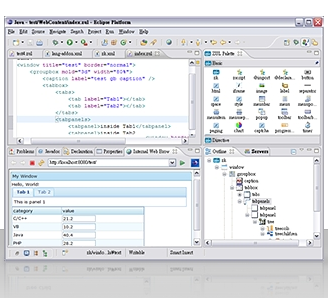
ZK Studio, a visual integrated development environment, provides easy and intuitive tools that span the entire application development lifecycle, including UI design, prototyping, development, and deployment tools for developing ZK applications.

ZK Studio provides content assist, WYSIWYG visual development, hyperlink highlight, syntax coloring, and many other exciting features. ZK Studio is the most efficient way to begin developing Ajax applications.

Feature Highlight
  • WYSIWYG visual development
  • Integrated with Ajax Framework
  • Intelligent Editor
  • Ajax Widgets Palette
  • Eclipse Integration - Plugin
  • Wizard for Projects, and Pages.
  • Automatic Update Manager
  • Code completion
Supported Plaform
  • Eclipse 3.4 - Ganymede
  • Eclipse 3.3 - Europa
  • MyEclipse

Source : zkoss.org

| Continue Reading..

Visual Studio 2010 and .NET Framework 4.0 Overview

Visual Studio 2010 and the .NET Framework 4.0 mark the next generation of developer tools from Microsoft. Designed to address the latest needs of developers, Visual Studio and the .NET Framework deliver key innovations in the following pillars:

  • Democratizing Application Lifecycle Management
    Application Lifecycle Management (ALM) crosses many roles within an organization and traditionally not every one of the roles has been an equal player in the process. Visual Studio Team System 2010 continues to build the platform for functional equality and shared commitment across an organization’s ALM process.
  • Enabling emerging trends
    Every year the industry develops new technologies and new trends. With Visual Studio 2010, Microsoft delivers tooling and framework support for the latest innovations in application architecture, development and deployment.
  • Inspiring developer delight
    Ever since the first release of Visual Studio, Microsoft has set the bar for developer productivity and flexibility. Visual Studio 2010 continues to deliver on the core developer experience by significantly improving upon it for roles involved with the software development process.
  • Riding the next generation platform wave
    Microsoft continues to invest in the market leading operating system, productivity application and server platforms to deliver increased customer value in these offerings. With Visual Studio 2010 customers will have the tooling support needed to create amazing solutions around these technologies.
  • Breakthrough Departmental Applications
    Customers continue to build applications that span from department to the enterprise. Visual Studio 2010 will ensure development is supported across this wide spectrum of applications.

Over the next few months we will provide more detail in each of these pillars. We will start with “Democratizing Application Lifecycle Management.”

Please check back shortly to see the next pillar, “Enabling emerging trends.”

Microsoft Visual Studio Team System 2010 – Democratizing Application Lifecycle Management
Visual Studio Team System 2010 will deliver new capabilities that embrace the needs of the users in the lifecycle – from architects to developers, from project managers to testers.

Among the great new functionality in VSTS 2010:

  • Discover and identify existing code assets and architecture with the new Architecture Explorer.
  • Design and share multiple diagram types, including use case, activity and sequence diagrams.
  • Improve testing efforts with tooling for better documentation of test scenarios and more thorough collection of test data.
  • Identify and run only the tests impacted by a code change easily with the new Test Impact View.
  • Enhanced version control capabilities including gated check-in, branch visualization and build workflow.

Key to a shared understanding of the application is the use of modeling tools. Modeling has traditionally been done by professional architects and system designers. Our approach is to enable both technical and non-technical users to create and use models to collaborate and to define business and system functionality graphically.

Visual Studio Team System 2010 includes a new Architecture Explorer for the discovery and exploration of existing code assets and application architectures.

More : msdn.microsoft.com

| Continue Reading..

Enter your email address:

Delivered by FeedBurner

Followers
