Microsoft releases SQL Server 2008

Microsoft has released SQL Server 2008 database to manufacturing, including with the release a new Web edition of the product aimed at its hosting partners, the company said Wednesday.

SQL Server 2008, which has been in beta testing for some time, is now available on the Microsoft Developer Network and Technet. An evaluation download will be available on the company's Web site on Thursday.

The product is available in seven editions, each designed for the needs of different customer segments. More information about the editions is available on the SQL Server 2008 Web site.

One of the editions that is new with the 2008 release is SQL Server 2008 Web. SQL Server 2008 Web is designed for hosting companies, providing the tools necessary to support low-cost, large-scale, highly available Web applications or hosting environments, according to Microsoft.

On a conference call Wednesday, company executives explained how feedback from customers spurred them to release a major upgrade to the database a mere three years after its previous release, SQL Server 2005.

They also felt the need to provide 10 reasons to justify upgrading to SQL Server 2008 when some companies have just begun to adopt the 2005 version of the product.

Customers might wonder "why would I upgrade?" only three years after the release, said Dan Jones, a SQL Server group program manager. He then went on to outline reasons -- including a new performance analysis tool and a resource governor that eases management of concurrent uploads -- for customers to adopt the new database.

In a press release, Microsoft cited several large enterprise customers who are testing SQL Server 2008, including Xerox, Siemens, Clear Channel Communications and Fidelity Investments.

Microsoft is trying to close the feature gap between its SQL Server product and Oracle's 11g database, and entice enterprise customers to use its software over Oracle's with a lower price point.

The company also is pushing SQL Server as much more than a database. The product is becoming the central data repository for Microsoft's data-management and business intelligence strategy. The company has made several recent acquisitions to achieve this end, including that of data-quality vendor Zoomix and data warehouse-appliance vendor DATAllegro.

IDG News Service

source : itworld.com

Technorati Tags: ,,
| Continue Reading..

Thailand bans Grand Theft Auto IV

Copies of Grand Theft Auto IV have been pulled in Thailand after a teenager confessed to murdering a taxi driver.

The 18-year-old high school student is accused of stabbing the cab driver to death by trying to copy a scene from the game.

The biggest video game publisher in the south-east Asian country, New Era Interactive Media, has told retailers to stop selling GTA IV.

It is due to be replaced by another video game title.

Death penalty

Thai newspapers say the teenager, whose name has been withheld, was arrested while trying to steer a cab backwards out of a Bangkok street with the driver still in the back seat.

Police claim the 18-year-old confessed to stealing the taxi and said he killed the 54-year-old driver after he fought back. The teenager could face the death penalty if he is found guilty.

Bangkok police Captain Veerarit Pipatanasak said: "He wanted to find out if it was as easy in real life to rob a taxi as it was in the game.

Ladda Thangsupachai, director of the ministry's Cultural Surveillance Centre, said: "This time-bomb has already exploded and the situation could get worse. Today it is a cab driver, but tomorrow it could be a video game shop owner."

Read more : news.bbc.co.uk

Technorati Tags: ,
| Continue Reading..

[Tutorial] Membuat Aplikasi dengan Visual Basic .NET 2008 - 2

Melanjutkan artikel kemarin, sebelum kita lanjutkan pembuatan aplikasi ini, ada baiknya kita berkenalan sedikit dengan LINQ.

Apa itu LINQ?

LINQ (Language Integrated Query), merupakan suatu bahasa yang digunakan untuk melakukan query terhadap suatu sumber data (-sederhananya-). LINQ terdiri dari beberapa pernyataan (statement) yang bisa diterapkan ke dalam program kita untuk memilih item dari beberapa koleksi (collection) berdasarkan kriteria yang berbeda.

Contoh struktur LINQ dan aturannya dalam aplikasi. Coba kita lihat daftar array di bawah ini:

Dim data() As Int16 = {3, 2, 5, 4, 6, 4, 12, 43, 45, 42, 65}


Untuk menentukan elemen dari array tersebut, kita akan menggunakan looping For..Next, mengeksekusi tiap elemen array, dan nantinya bisa menyimpannya ke dalam array baru atau menghapusnya. Untuk memilih elemen dengan nilai yang lebih kecil dari 10, kita gunakan kode di bawah ini:


Dim nilaiKecil(data.Length-1) As Integer 
Dim itm As Integer = 0
For i As Integer = 0 To data.Length
If data(i) < 10 Then
nilaiKecil(itm) = data(i)
itm += 1
End If
Next
ReDim nilaiKecil(itm)


Akan lebih mudah menyimpan elemen-elemen yang telah terpilih ke dalam suatu ArrayList menggunakan looping seperti di bawah ini:


Dim nilaiKecil As New ArrayList 
Dim itm As Integer
For Each itm In data
If itm < 10 Then
nilaiKecil.Add(itm)
End If
Next


Bila kita menggunakan LINQ,


Dim nilaiKecil = From n In data _ 
Where n < 10 _
Select n


Penggunaan bahasa dalam LINQ hampir sama dengan bahasa yang digunakan dalam SQL. Jika kita telah terbiasa dengan bahasa yang digunakan dalam SQL, kita akan menemukan beberapa kemiripan.


Contoh pernyataan SQL:


SELECT *

FROM data


WHERE data.n < 10


(Contoh di atas mengasumsikan dalam database kita terdapat tabel data yang memiliki kolom bernama n). Bila menggunakan LINQ, kode kita menjadi:


Dim = From n In data

Where n < 10


Ok, cukup teorinya... kita langsung saja ke praktek pembuatan program ;)


Pada tutorial kemarin kita telah membuat database barang dan kategori menggunakan SQL Express 2005, nah sekarang kita akan membuat tiap-tiap form untuk form barang dan untuk form kategori. Ikuti langkah-langkah berikut:


1. Menambah Form Barang


Tambahkan satu form dan beri nama frmBarang, dengan cara memilih menu Project > Add Windows Form atau dengan mengklik kanan nama proyek kita di solution explorer dan memilih Add > Windows Form. Akan muncul window Add New Item, masukkan nama frmBarang dan klik add.
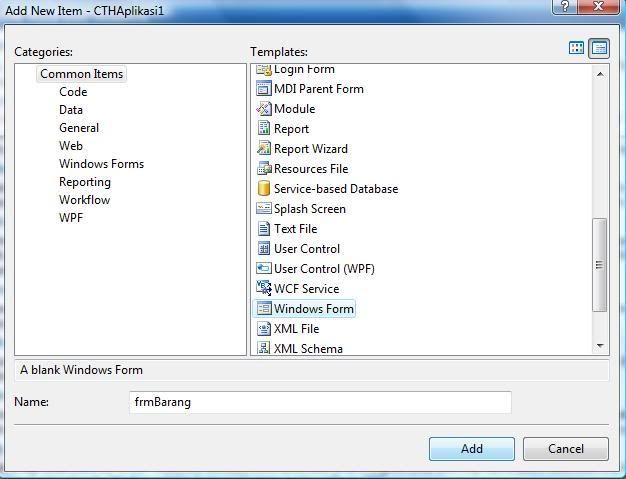


Akan muncul form baru dengan nama frmBarang. Atur besar form sesuai keinginan.


2. Property Form Barang


(Skip jika ingin melewati bagian ini.)


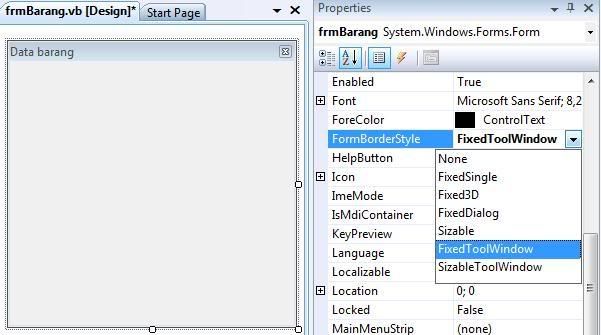
Buka jendela property dari form barang (frmBarang) atau dengan cara menekan tombol F4. Atur property frmBarang sebagai berikut:


  • Text : Data barang


  • FormBorderStyle : FixedToolWindow


Ini hanya sekedar contoh dari property suatu form yang sering saya buat, silahkan di ubah sesuai keinginan.


3. Menambah DataGridView


Tampilkan jendela Toolbox (default: bagian kiri) dengan memilih menu View > Toolbox atau dengan menekan kombinasi tombol CTRL+ALT+X.


Geser control DataGridView ke dalam frmBarang:
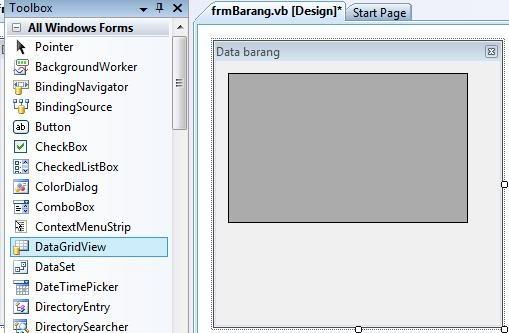


Nama DataGridView1 akan secara otomatis diberikan untuk control DataGridView tadi.


4. Menampilkan data ke dalam DataGridView


Sekarang kita akan mencoba menampilkan data ke dalam control DataGridView1, data yang akan ditampilkan diambil dari tabel 'barang' dan tabel 'kategori.


Double klik tampilan frmBarang, maka kita akan masuk ke dalam tampilan Code View.


Ketikkan perintah berikut di bagian Private Sub frmBarang_Load


Dim db As New DataClasses1DataContext 
Dim qBarang = From barang In db.barangs _
Join kategori In db.kategoris _
On kategori.KDKategori Equals barang.KDKategori _
Select barang

Me.DataGridView1.DataSource = qBarang


Pada kode di atas (Hampir sama dengan pernyataan SQL) kita memulai dengan mendeklarasikan db sebagai object dari Class DataClasses1DataContext, kemudian membuat suatu variable baru dengan nama qBarang dan menuliskan query LINQ yang berfungsi untuk mengambil data dari 2 tabel (barang dan kategori, yang memiliki relasi pada kolom KDKategori) dari database. Hasil dari query LINQ tersebut akan ditampilkan dalam control DataGridView1 dengan menggunakan object DataSource dari property DataGridView1.


Kode lengkapnya seperti ini:


Private Sub frmBarang_Load(ByVal sender As System.Object, ByVal e As System.EventArgs) Handles MyBase.Load 
Dim db As New DataClasses1DataContext
Dim qBarang = From barang In db.barangs _
Join kategori In db.kategoris _
On kategori.KDKategori Equals barang.KDKategori _
Select barang

Me.DataGridView1.DataSource = qBarang

End Sub


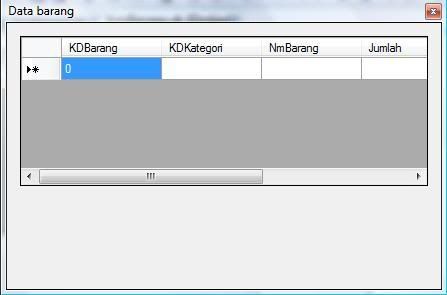
Sebelum kita mencoba menjalankan program ini, pastikan frmBarang merupakan Startup Form dengan cara memilih menu Project  > CTHAplikasi1 Properties. Pada tab Application bagian Startup form, pilih frmBarang sebagai form yang akan di load saat pertama kali aplikasi dijalankan. Jalankan aplikasi dengan menekan tombol F5.


Tampilan form setelah dijalankan (masih kosong karena belum ada data yang dimasukkan.. ) :


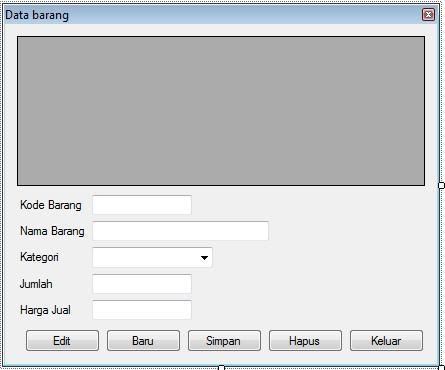
5. Menambah kontrol tombol, teks dan label.


Aplikasi kita sudah bisa dijalankan, tetapi kita masih perlu menambahkan tombol dan teks serta label ke dalam frmBarang agar memudahkan dalam interaksi dari user terhadap aplikasi.


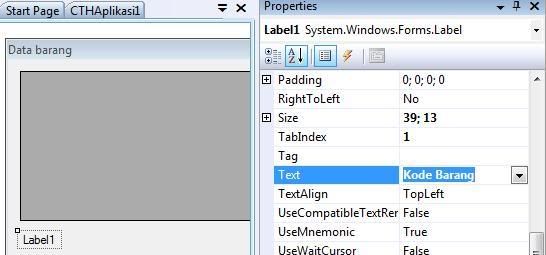
Kembali ke Designer View (Klik kanan di area kosong di bagian kode dan pilih View Designer atau dengan menekan kombinasi tombol Shift+F7) dan tambahkan 1 label, dengan cara menggeser control Label dari Toolbox ke dalam frmBarang. Pada bagian property untuk Label1, untuk text masukkan 'Kode Barang:' dan untuk name masukkan 'lblKode'.


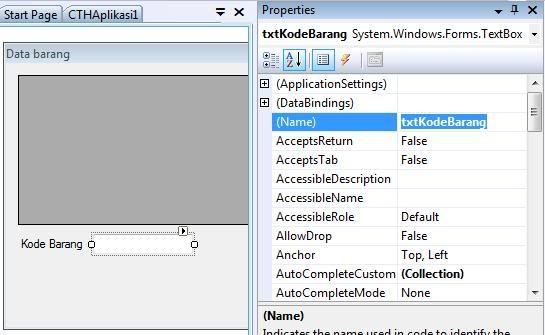
Tambahkan Control TextBox ke dalam frmBarang, dengan property, name: txtKodeBarang dan pada bagian text dikosongkan.


Lakukan hal yang sama untuk 4 Label, 1 ComboBox dan 3 TextBox selanjutnya dengan property sebagai berikut:


Control ComboBox: name = cmbKategori


Control TextBox: name = txtNamaBarang, text = dikosongkan


Control TextBox: name = txtJumlah, text = '0'


Control TextBox: name = txtHargaJual, text = '0'


Control Label: name = lblKategori, text = 'Kategori'


Control Label: name = lblNamaBarang, text = Nama Barang'


Control Label: name = lblJumlah, text = 'Jumlah'


Control Label: name = lblHargaJual, text = 'Harga Jual'


Sehingga hasilnya menjadi :
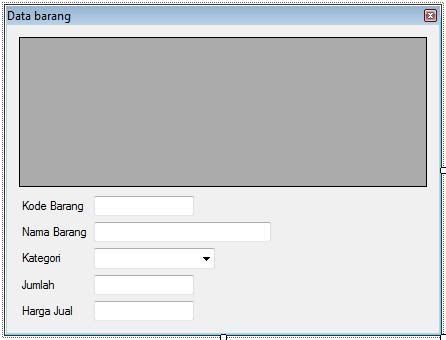


Setelah penambahan TextBox, Label serta ComboBox di atas selesai, kita lanjutkan dengan menambahkan Tombol-tombol (Button).


Klik dan geser 5 buah Control Button dari Toolbox ke dalam frmBarang dengan nilai property masing-masing:


Tombol 1: name = cmdEdit, Text = 'Edit'


Tombol 2: name = cmdBaru, Text = 'Baru'


Tombol 3: name = cmdSimpan, Text = 'Simpan'


Tombol 4: name = cmdHapus, Text = 'Hapus'


Tombol 5: name = cmdKeluar, Text = 'Keluar'
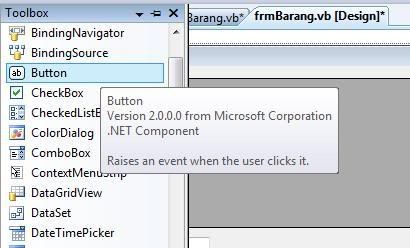


Sehingga tampilan akhir dari frmBarang akan menjadi :


6. Bersambung....


Yups, sekian dulu untuk tutorial bagian ke-2 ini. Nantinya kita akan mencoba menuliskan kode ke dalam frmBarang untuk mengeksekusi perintah saat ke lima tombol di atas diklik.


Tambahan (Upgrade dari VB 2005 ke VB 2008)


Mungkin masih banyak yang belum mengetahui bagaimana mengaktifkan LINQ dalam suatu project yang telah di upgrade dari VB 2005 ke VB 2008. (LINQ cuman ada di VB 2008).


Sekedar tambahan bagi yang menggunakan VB 2005 yang ingin bermigrasi ke VB 2008 dan ingin bereksperimen dengan LINQ:


  1. Konversi project ke VB 2008, setelah proses konversi berakhir,


  2. Buka Project Property


  3. Masuk ke tab Compile


  4. Pada Option Infer, pilih On.


  5. Masuk ke tab Reference


  6. Tambahkan reference System.Linq


  7. Tutup dan buka kembali project-nya..


Technorati Tags: ,
| Continue Reading..

Over 500 of free database models for programmer

Ten of this Data Models are featured as Starter Databases for Microsoft SQL Server 2005 Express.
Here are more than 500 very useful 'Kick-Start' Data Models that Barry Williams have created since he started 5 years ago. If you would like an Access Database for any of these Models, email at dba_requests-at-myway.com, simply replace -at- by an @ sign, and put the Database name in the Subject.

  • Access Control
  • Accidents at Work
  • Accommodation (Long-term)
  • Actions,Decisions,People & Property
  • Afghanistan Rainfall
  • Agents and Leads
  • Agents Commissions
  • Aircraft Parts and Orders
  • Airline Reservations
  • Amazon and Starbucks
  • Animal Shelters
  • Apartment Rentals
  • Aquarium Stores
  • Area Regulations
  • Archeology
  • Ars Digita BootCamp
  • Assets Maintenance
  • Asylum Seekers and Refugees
  • Athletes and Events
  • Athletes and Teams
  • ATM Machines
  • Auction Web Site
  • Avon Cosmetics
  • Baby-Sitters and Nannies
  • Ballet Companies (Casting Productions)
  • Ballet Companies (Org and People)
  • 'Bang for the Buck' Models
    1. Catalogs of Products
    2. Customers and Products
    3. Customers and Services
    4. Marriages (Contemporary)
    5. Marriages (Traditional)
    6. Partnerships and Relationships
    7. Product Catalogs
    8. Generic Foundation
    9. Reservations
  • Bank and Branches
  • Banking (Online) New
  • Bankrupts
  • Basel II Accord
  • BBC (UK)
  • Behavior Monitoring
  • More : databaseanswers.org

    Technorati Tags: ,
    | Continue Reading..

    Download Windows Vista® Performance and Tuning Guide

    Improve Performance Quickly and Easily
    This guide focuses on performance improvements on a single computer, but also takes a look at some of the tools used in enterprise environments to help make performance tuning manageable on a much larger scale.

    Windows Vista and SP1 focus on delivering greater performance and overall system responsiveness. By striking a balance between speed and responsiveness, Windows Vista and SP1 deliver a level of performance that has the greatest positive impact on the system’s usability.This guide looks at the following areas of performance improvement:

    • Making configuration changes that help a computer feel more responsive when you use it.
    • Using hardware to boost the actual physical speed of a computer.
    • Making configuration changes that help a computer to start faster.
    • Making the computer more reliable may help increase performance.
    • Monitoring performance occasionally so that you can stop problems before they get too big.

    Download : microsoft.com

    Technorati Tags: ,,
    | Continue Reading..

    KallOut - The new way to search using only your mouse

    What is KallOut?

    KallOut is the first application to bring "selection-based search" to any web page, email, presentation, document, spreadsheet or PDF. Unlike other search methods that are trapped inside the browser, KallOut serves up content from the most popular sites on the web inside floating information palettes (which we call KallOuts). Using only your mouse, you can now avoid the disruption of launching a browser and let KallOut bring you the best the web has to offer.

    How does KallOut improve search?

    Since the creation of the web, search has been trapped inside the browser. KallOut sets it free.
    Today's "browser-based search" systems disrupt your workflow because they require you to leave where you are, launch your favorite search engine in a new browser or tab, type in a search term and then view your search results. The entire search process is trapped inside the web browser. Accessing information requires you to constantly shift between tabs in your browser or applications on your desktop which divides your attention and makes you less productive.
    KallOut’s "selection-based search" system makes searching the Internet a seamless extension to the everyday tools you already use. Like a friendly, well-informed, travel guide, KallOut goes where you do and, upon request, provides you with the best background information available in a manner that doesn't distract you from your primary focus. You can immediately access the best the web has to offer by selecting any word or phrase without leaving the page you're reading.

    The result is a more productive experience without the constant pain of opening up new browsers and tabs everytime you need to search.

    Download and Info : kallout.com

    Technorati Tags: ,,
    | Continue Reading..

    Windows Live FrameIt, a Small Piece of Windows Live Wave 3

    Microsoft is currently cooking Wave 3 of its Windows Live suite of products and services. As of July 30, the Redmond company unveiled Windows Live FrameIt, a new Windows Live service built as an integral part of Wave 3.

    FrameIt is in beta stage as of yet, but it is open to the general public. The service is designed to enhance the content delivered to digital photo frames. According to the official description of FrameIt, users will be able to compile photo collections and then have them streamed directly to a digital photo frame. In this regard, all devices featuring RSS capabilities will be able to receive photos via FrameIt.

    "FrameIt has some wrinkles that we are still trying to iron out and we have a lot of features in the pipeline. Please accept our apologies if you run into any of our bugs," revealed a Windows Live program manager. Initially reported by LiveSide, FrameIt can gather content from an extensive catalog of media sources.

    Users will be able to stream not only photos, but additional items through the service from websites offering Photo-sharing, news and information, learning and entertainment materials. According to Microsoft, users are free to have collections with up to 100 different sources. In the end, the Redmond company also permits users to set up customized settings for their feeds. The personalization options include the resolution of images as well as the background color.

    "Windows Live FrameIt allows you to gather images and content from across the Internet onto your digital photo frame. You can use FrameIt to include information services, like weather forecasts, amongst your digital photos. You can also use it to gather digital photos from your friends and family onto your frame. Even if everyone you know is using a different photo sharing service, you can include their photos on your frame. To do this, you need to know the RSS feed for their photos or you can use the media sources we've created for various sites," Microsoft said in the welcome message to FrameIt.

    source: news.softpedia.com

    Technorati Tags: ,,
    | Continue Reading..

    Enter your email address:

    Delivered by FeedBurner

    Followers
